

Step 1: (This step is unnecessary if the “Developer” tab is already displayed on PowerPoint.)
Select the “File” tab in PowerPoint, then click on “Options” at the bottom left of the screen.
In the PowerPoint Options window, select “Customize Ribbon” from the left pane, and then check the “Developer” checkbox under the “Main Tabs” on the right side of the screen.
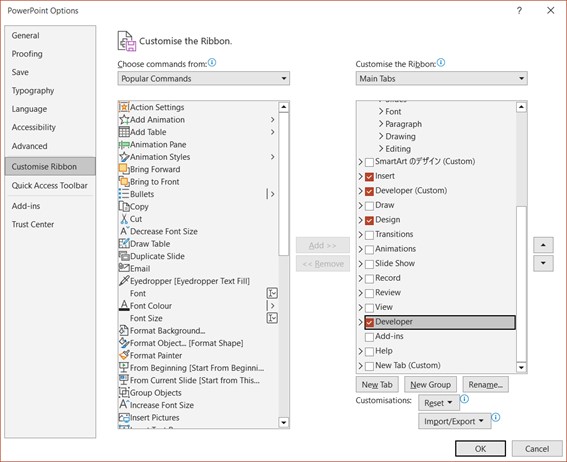
After checking the checkbox, click the “OK” button at the bottom right of the screen.
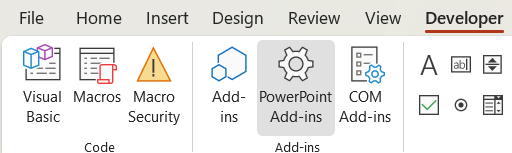
Statep 2: Select the “Developer” tab from the top of PowerPoint, then click on “PowerPoint Add-ins” (the gear icon).
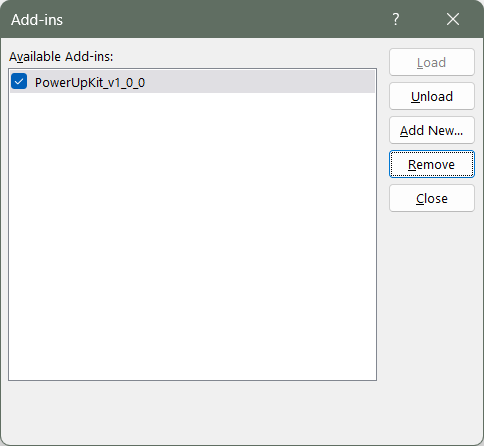
The Add-in screen will appear, so please check the installed Add-in “PowerUpKit_v1_x_x.ppam” checkbox and click the “Remove from list (R)” button.
Comments